








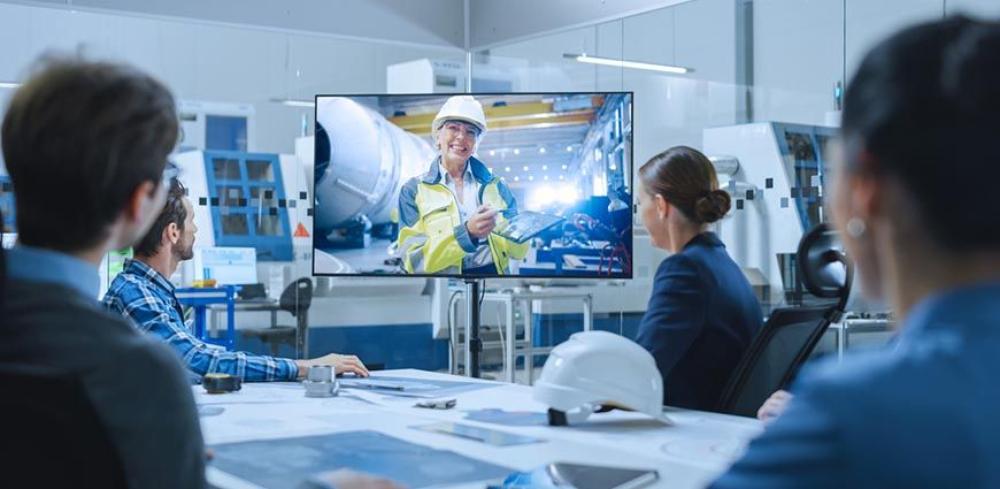
When a conference room is poorly equipped, it says something before a single word is spoken. Blurry video, echo-heavy audio, and a remote presenter nobody can hear all chip away at trust and cut meetings short. Philadelphia organizations run into this more than they should, and the fix almost always comes down to what gets installed and how.
A professional AV installation isn't just a list of expensive purchases. It's a coordinated system where every component actually serves the people in the room. Six components define what every professional conference room AV installation needs to cover.
Display Technology Matched to the Room
Professional display selection starts with the room itself. The right screen for a 10-person boardroom differs from what works in a 4-person huddle space, and getting that wrong means people strain to read slides or the image overwhelms a small space.
When evaluating conference room AV setup services in Philadelphia, you'll find that display recommendations take into account viewing distance, ambient lighting conditions, and whether the screen needs to double as a shared whiteboard.
Most professional installs use commercial-grade displays rather than consumer TVs, because commercial panels tolerate extended daily use and carry display-specific warranties.
Options typically include flat-panel LED displays, short-throw laser projectors, or dual-screen setups for rooms where collaboration and video conferencing happen at the same time. Resolution standards have shifted - 4K displays are now common even in mid-size rooms, because clarity matters at close range.
Audio Equipment That Actually Covers the Room
Clear audio is the single most undervalued element in a conference room. Video quality grabs attention, but bad audio ends calls. A remote participant who asks "can you repeat that?" every three minutes creates the kind of friction that kills productivity dead.
Professional AV installations include ceiling microphones, table-mounted boundary mics, or beamforming mic arrays depending on room size and table configuration. The goal is consistent pickup coverage across the full seating area, with no dead zones and minimal background noise.
Speaker placement matters just as much as microphone selection. Wall-mounted or ceiling speakers must cover the full room without creating audio hot spots near one end of the table.
A professional installer measures the room's acoustic characteristics before specifying any equipment; rooms with hard surfaces, glass walls, or low ceilings need additional acoustic treatment to prevent echo, and that gets addressed at the installation stage rather than as an afterthought.
Video Conferencing Infrastructure
A camera mounted on a shelf and plugged into a laptop isn't a conference room video solution. It's a workaround. Professional video conferencing infrastructure means a dedicated room camera, a purpose-built codec or PC endpoint, and a properly configured network connection that doesn't fight with the building's general Wi-Fi traffic.
Camera selection depends on room depth and table orientation. Wide-angle cameras suit small huddle rooms, while larger boardrooms need PTZ (pan-tilt-zoom) cameras that can track speakers or shift between preset views. Auto-framing cameras have become a practical standard in many installs because they cut the need for manual adjustments mid-meeting.
On the software side, professional installs configure the room system to work natively with the platforms your organization actually uses. Whether that's Microsoft Teams Rooms, Zoom Rooms, or Cisco Webex, the hardware and software stack must be certified to work together.
A system that drops video every 20 minutes isn't a hardware failure; it's usually a configuration problem that a professional integrator catches before commissioning.
Control Systems and Design
The best AV system in the world fails if people don't know how to turn it on. Control system design is where professional AV installation separates itself from a DIY setup.
Touch panel controllers - typically mounted near the room entrance or embedded in the table - pull every function into a single interface. One tap starts the display, powers the camera, routes audio to the right output, and sets the lighting scene for a video call. That sequence, programmed by a certified control system integrator, takes about three seconds.
Control systems also handle room scheduling. A panel outside the room can show current occupancy and upcoming bookings pulled directly from your calendar system. Inside, the same panel handles everything from display brightness to microphone muting.
Room control programming is custom work, not a plug-and-play product, and it's one area where professional installation costs pay for themselves quickly in reduced IT support tickets.
Cabling, Infrastructure, and Power Management
What you see in a finished conference room accounts for maybe 20 percent of a professional AV installation. The rest lives in the walls, the ceiling, and the rack. Structured cabling runs for audio, video, control signals, and network connectivity must go in before walls are closed, which means professional AV teams coordinate closely with general contractors and electricians throughout construction.
HDMI and USB-C connection points at the table surface let users present from their own devices without adapters or hunting for a cable. These table box connections are part of a complete infrastructure plan, not a feature bolted on later.
Power management matters too. AV equipment on unprotected power lines gets damaged by surges and power fluctuations.
A professional install includes a rack with proper UPS (uninterruptible power supply) protection, surge suppression, and sometimes remote power cycling so IT teams can reboot equipment without entering the room. Cable management inside the rack keeps airflow open and makes future service straightforward.
System Testing, Commissioning, and Ongoing Support
Installation day isn't the finish line. A professional AV project includes a formal commissioning process where every input, output, and control function gets tested against the original design spec. That means verifying audio levels at every seat, confirming camera coverage at different lighting conditions, and walking end users through the controls.
But support after go-live is what separates a long-term AV partner from a one-time contractor. Professional integrators offer service agreements covering remote monitoring, firmware updates, and on-site response when something breaks.
Conference rooms are revenue-generating spaces; a system failure before a client presentation is a real business problem, not just an inconvenience.
Ask any AV provider for straight answers on response times, remote monitoring capabilities, and what the service agreement actually covers. A system installed without a support plan is a liability. One backed by a responsive team holds its value for years.
Conclusion
A professional conference room AV installation covers display technology, audio coverage, video conferencing infrastructure, control system design, structured cabling, and post-installation support.
Each component depends on the others; a great camera paired with bad audio still produces a bad meeting. The investment makes sense when you treat a conference room as a tool your team relies on daily, not just a room with a screen on the wall.